Reverse Proxy
by Hugo Hernández Valdez

Introduction
In software development, we often find ourselves with the need to handle network requests in a more controlled and secure manner, especially when it comes to web applications. This is where Reverse Proxies come into play.
Today, we will discuss how you can build your own Reverse Proxy using the Go programming language. But before diving into the code, let's first understand what a Reverse Proxy is and its importance.
What is a Reverse Proxy and What is it Used For?
A proxy server, in general terms, is an intermediate station that is located between users and the resources they want to access, whether web pages, services, or any other type of data. A Reverse Proxy, however, works a bit differently: it serves as an intermediary for requests coming from the Internet that seek to access a server located behind it.
How exactly does a Reverse Proxy work?
When Client A requests something from Server B, it does not actually do so directly. Instead, the request goes to the Reverse Proxy, which then contacts Server B on behalf of Client A. Thus, from the client's point of view, it seems that the Reverse Proxy is doing all the work, when in reality the latter is simply transmitting messages back and forth between the client and the server.
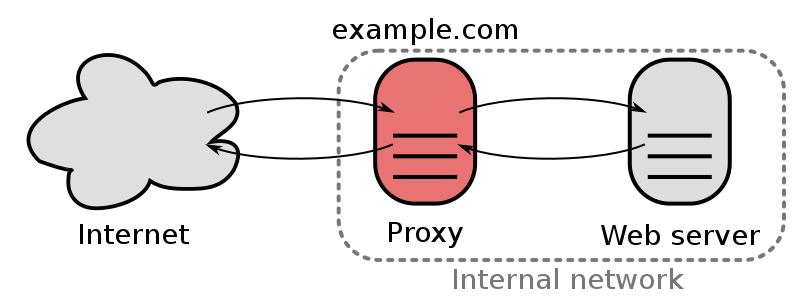
This has several functions that go beyond simply adding an extra step in a transaction.
Main Functions
The Reverse Proxy generally performs several functions:
1. Load balancing
A Reverse Proxy can distribute the load in various ways to several servers. This means that incoming request distribution algorithms can be established to different servers to distribute the workload, preventing a single server from being saturated with all requests.
2. Security
Reverse Proxies hide information from real servers and their performance, which is especially useful for protecting individual servers or for maintaining the confidentiality of the internal network.
3. Content caching
Reverse Proxies can store static content in their cache. When a user requests this content, the Reverse Proxy can deliver it directly without having to forward the request to the original server. This improves network efficiency and speed.
4. Content compression
Some Reverse Proxies can compress server responses before sending them to the client. This reduces the amount of data transferred between the server and the client, improving speed and efficiency.
Implementation
Now that we know what a Reverse Proxy is and what it is used for, let's start with the fun! First, let's build a simple web server using Go: This simple server listens on port 9001 and handles incoming HTTP requests through the handleRequest function. For each request, it logs the request details, adds a response in a custom header, and responds with HTTP status 202 Accepted and a confirmation message.
Our Reverse Proxy Now, let's implement the Reverse Proxy that redirects all requests to the specified endpoint. Let's analyze some key parts of this code:
package main

import (
	"flag"
	"io"
	"log"
	"net/http"
	"net/http/httputil"
	"time"
)

const ServerTimeout = 5 * time.Second
const ServerPort = ":9000"

func main() {
	// Get the endpoint as a flag
	endpoint := processFlags()

	// Start the server
	startServer(endpoint)
}

// processFlags captures endpoint from command line flags
func processFlags() *string {
endpoint := flag.String("e", "", "")
flag.Parse()

	if *endpoint == "" {
		log.Fatal("endpoint is required")
	}

	return endpoint
}
In the main method, we call processFlags to capture arguments from the command line. Here, we look for a -e argument that represents the endpoint to which we want to redirect our requests. Every time we start our Reverse Proxy, we will need to provide this endpoint. The startServer method starts the server, and we pass the forwardRequest function as the request handler. Therefore, every time a new request is received, forwardRequest is the one that will process it. Now, let's see how forwardRequest handles the request:
// forwardRequest forwards requests to the specified endpoint
func forwardRequest(endpoint *string, rw http.ResponseWriter, r *http.Request) {
	// Create a new request
	req, err := http.NewRequest(r.Method, *endpoint, r.Body)
	if err != nil {
		processErr(rw, err)
		return
	}

	prepareRequest(r, req)

	// Actually forward the request to our endpoint
	resp := doRequest(req, rw)
	if resp == nil {
		return
	}
	defer resp.Body.Close()

	processResponse(resp, rw)
}
The forwardRequest method creates a new HTTP request with the URL of our endpoint, the method of the original request, and the body of the original request. If there is any error creating the new request, processErr is called (a simple method that handles any error that may occur during this process) and execution stops. Subsequently, the doRequest method is called to effectively make the redirection to our endpoint, through an HTTP client.
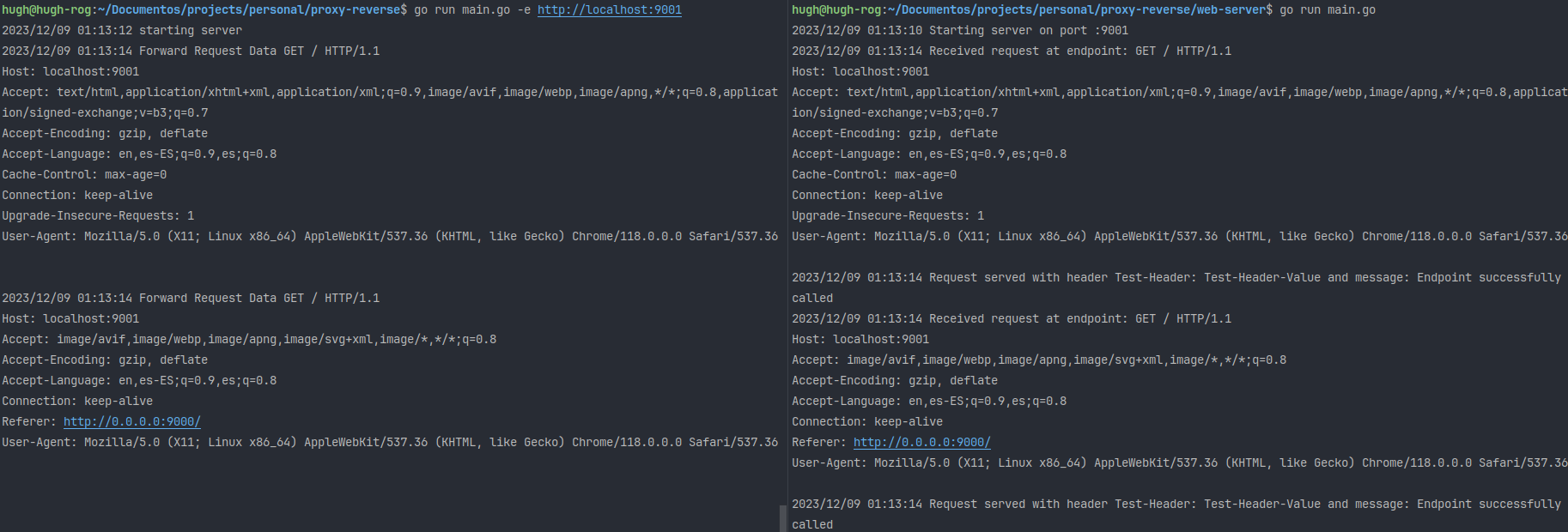
Finally, we can visualize its behavior in the following image:
If you want to see the complete code of the 'reverse proxy', it is found here.
Conclusion
Reverse Proxies are essential tools in the modern world of web applications, whether for load balancing, ensuring security, or caching content. Go offers us a simple but robust way to implement a Reverse Proxy, allowing us to redirect and handle requests in the way we want. Whether you are building a large microservices application or are just looking to learn more about networks and HTTP requests, creating your own Reverse Proxy is an excellent way to deepen your understanding of web application development.
Related posts
SSH Tunnel Manager: Building a CLI Tool for Managing Multiple SSH Tunnels
A deep dive into SSH Tunnel Manager, a Go-based TUI application for managing multiple SSH tunnels simultaneously. Learn about the architecture, technical decisions, and lessons learned.

Slog: Simplifying Structured Logging in Go Applications
Slog: an efficient and flexible structured logging solution for Go applications. Get insights into software behavior and troubleshoot problems easily. Discover how to improve your logging process today!