SSH Tunnel Manager: Building a CLI Tool for Managing Multiple SSH Tunnels
by Hugo Hernández Valdez
Introduction
If you work with remote servers, databases in the cloud, or services behind firewalls, you probably use SSH tunnels regularly. The command ssh -L works fine for an occasional tunnel, but when you need to maintain multiple simultaneous connections, management quickly becomes complicated.
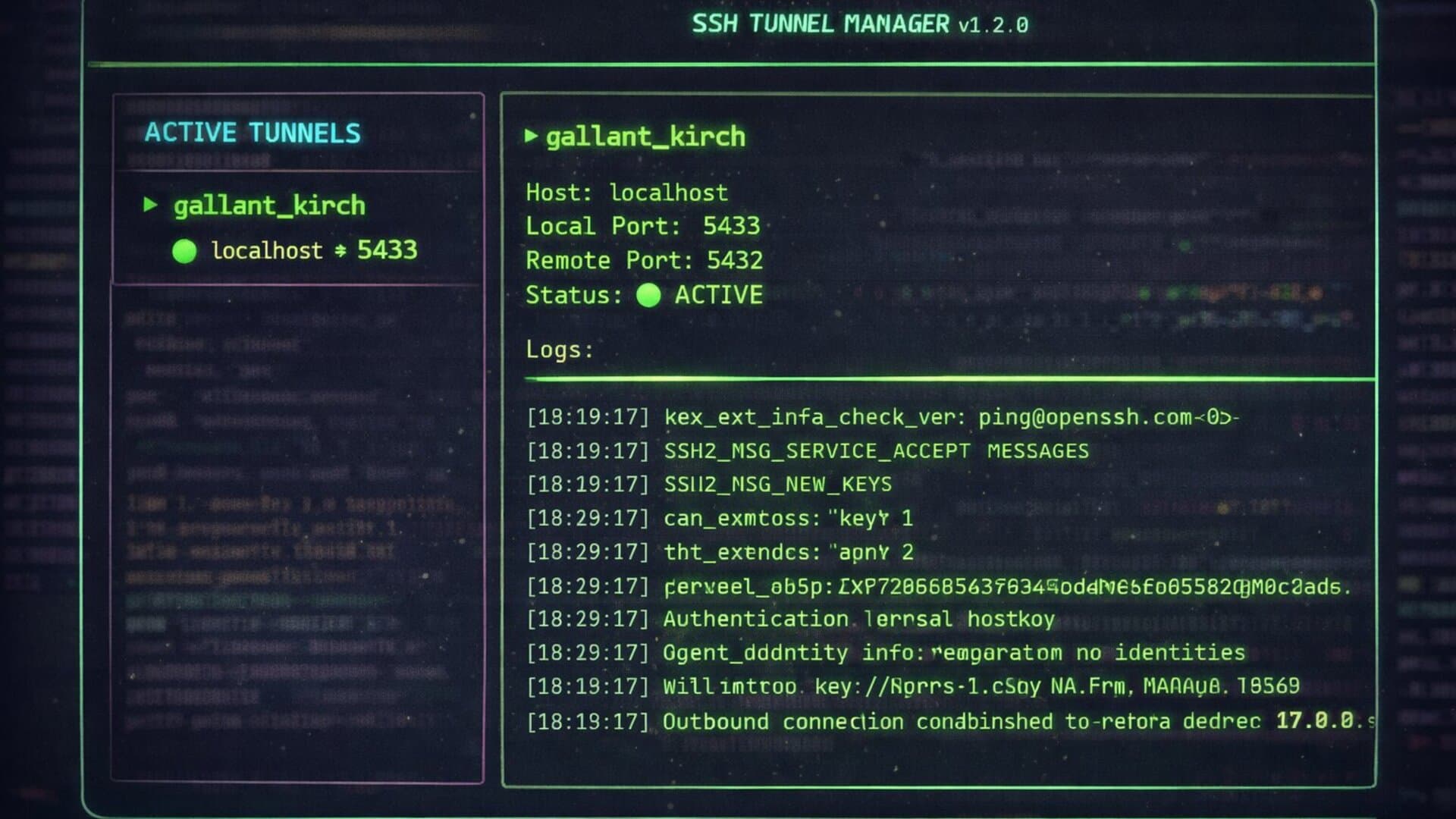
After months of opening multiple terminal tabs, writing down ports in text files, and accidentally killing the wrong tunnel, I decided to build a solution: SSH Tunnel Manager, a terminal UI (TUI) application that centralizes SSH tunnel administration in a single interface.
This article covers the technical decisions, architecture, and lessons learned during development.
The Problem
SSH tunnels are essential for:
- Accessing remote databases securely
- Exposing local services during development
- Bypassing firewall restrictions
- Testing services in staging environments
However, managing multiple tunnels simultaneously presents challenges:
- Tracking: Which local port maps to which remote port?
- Status: Is this tunnel still active or did it drop?
- Logs: SSH outputs connection details to stderr, but it's scattered across terminal tabs
- Cleanup: Killing specific tunnels without affecting others
My workflow involved 4-5 terminal tabs with commands like:
ssh -N -L 8080:localhost:80 user@server1.com
ssh -N -L 5432:localhost:5432 user@db.server.com
ssh -N -L 3000:localhost:3000 user@staging.server.com
No visibility, no centralization, easy to make mistakes.
The Solution
SSH Tunnel Manager provides:
- Multiple simultaneous tunnels in a single interface
- Real-time logs per tunnel
- Automatic naming (Docker-style:
brave-tesla,happy-curie) - Full keyboard and mouse navigation
- Confirmation modals for destructive actions
- SSH config integration
Technical Architecture
Technology Stack
- Go 1.21+
- Bubbletea (TUI framework by Charm.sh)
- Lipgloss (CSS-like styles for terminal)
- Bubbles (UI components)
- Moby names (Docker's name generator)
Why Go?
I chose Go for several reasons:
- Single binary: No external dependencies. Users download one file and it works.
- Cross-platform: Compile once for Linux, macOS Intel, and macOS Apple Silicon.
- Goroutines: Perfect for handling multiple concurrent SSH connections.
- Performance: Low memory footprint, fast startup.
Alternatives considered:
- Python: Would require virtualenv or pip install
- Node.js: Needs npm global installation
- Rust: Great option, but longer compile times and steeper learning curve for contributors
Architecture: Navigator + Workers
The design is intentionally simple:
-
Main Goroutine (Navigator): Runs the Bubbletea TUI loop, handles keyboard/mouse input, renders the interface every second.
-
Worker Goroutines (one per tunnel): Each tunnel runs independently, reads SSH stderr, updates its own logs.
-
Communication: No complex channels or message passing. Workers write logs with mutex protection, the navigator reads when rendering.
// Each tunnel has its own goroutine for reading logs
go m.streamTunnelLogs(&m.tunnels[len(m.tunnels)-1], stderr)

// The stream function runs independently
func (m *model) streamTunnelLogs(tun *tunnel, stderr io.ReadCloser) {
    scanner := bufio.NewScanner(stderr)
    for scanner.Scan() {
        tun.logMutex.Lock()
        tun.logs = append(tun.logs, fmt.Sprintf("[%s] %s", time.Now().Format("15:04:05"), scanner.Text()))
        if len(tun.logs) > 100 {
            tun.logs = tun.logs[1:] // Keep only last 100 lines
        }
        tun.logMutex.Unlock()
    }
}
Thread Safety with Mutex
Each tunnel has its own mutex to protect concurrent access to logs:
type tunnel struct {
    id         int
    tag        string
    host       string
    localPort  string
    remotePort string
    verbose    bool
    cmd        *exec.Cmd
    logs       []string
    active     bool
    logMutex   sync.Mutex  // ← Protects concurrent access
}
Without the mutex, the race detector would fail because:
- The tunnel goroutine writes to
tun.logs - The UI goroutine reads from
tun.logswhen rendering
SSH Config Parsing
The tool automatically reads hosts from ~/.ssh/config:
func getSSHHosts() []string {
    file, _ := os.Open(os.Getenv("HOME") + "/.ssh/config")
    defer file.Close()

    var hosts []string
    scanner := bufio.NewScanner(file)
    re := regexp.MustCompile(`^Host\s+(.+)`)

    for scanner.Scan() {
        line := scanner.Text()
        if matches := re.FindStringSubmatch(line); matches != nil {
            host := strings.TrimSpace(matches[1])
            if host != "*" {
                hosts = append(hosts, host)
            }
        }
    }

    return expandSSHHosts(hosts)
}
The expandSSHHosts function also extracts the Hostname field, so users can select either the host alias or the actual hostname.
Port Validation
Before creating a tunnel, the tool checks if the local port is already in use:
func isPortInUse(port string) bool {
    cmd := exec.Command("ss", "-tuln")
    output, err := cmd.Output()
    if err != nil {
        return false
    }
    return strings.Contains(string(output), ":"+port+" ")
}
This prevents the common error of trying to bind to an already occupied port.
Key Features
Multiple IPs per Host
Some hosts resolve to multiple IPs (DNS round-robin, load balancers). The tool detects this and allows users to choose:
func extractAllHostnames(hostWithIP string) []string {
    parts := strings.Fields(hostWithIP)
    if len(parts) <= 1 {
        return []string{}
    }
    result := []string{parts[0]}  // Host alias
    result = append(result, parts[1:]...)  // All IPs
    return result
}
Automatic Naming
Inspired by Docker's container names, the tool uses moby/moby/pkg/namesgenerator:
import "github.com/moby/moby/pkg/namesgenerator"

name := namesgenerator.GetRandomName(0)
// Returns names like: "peaceful-einstein", "brave-tesla"
Users can still provide custom names, but the auto-generated ones save time and add personality.
Multi-platform Build
The Makefile compiles for all target platforms:
build:
	GOOS=linux GOARCH=amd64 go build -ldflags="-s -w" -o build/ssh-tunnel-manager-linux-amd64
	GOOS=darwin GOARCH=amd64 go build -ldflags="-s -w" -o build/ssh-tunnel-manager-darwin-amd64
	GOOS=darwin GOARCH=arm64 go build -ldflags="-s -w" -o build/ssh-tunnel-manager-darwin-arm64
The -ldflags="-s -w" strips debug symbols, reducing binary size by ~30%.
Installation Script
The install script (install.sh) handles:
- Detecting OS and architecture
- Downloading the correct binary from GitHub Releases
- Setting executable permissions
- Moving to
/usr/local/bin
curl -sSL https://raw.githubusercontent.com/gouh/ssh-tunnel-manager/main/install.sh | bash
Usage Examples
Basic Usage
# Start the application
ssh-tunnel-manager

# Keyboard shortcuts
n       - Create new tunnel
d       - Delete selected tunnel (with confirmation)
Tab     - Switch between tunnel list and logs panel
↑/↓     - Navigate list / scroll logs
j/k     - Vim-style navigation (alternative to arrows)
?       - Show help overlay
q       - Quit (with confirmation)
Use Case 1: Remote Database Access
You need to work with a PostgreSQL database on a remote server:
- Run
ssh-tunnel-manager - Press
n - Select your database server (e.g.,
db.production) - Enter remote port:
5432 - Enter local port:
5432 - Tag:
postgres-prod(or Enter for random) - Verbose:
n
Now you can connect your local PostgreSQL client to localhost:5432 and you're connected to the remote database.
Use Case 2: Multiple Microservices
You're developing locally and need to connect to multiple services in staging:
Tunnel 1: localhost:8080 → staging-api.company.com:8080
Tunnel 2: localhost:3000 → staging-web.company.com:3000
Tunnel 3: localhost:5432 → staging-db.company.com:5432
Tunnel 4: localhost:6379 → staging-redis.company.com:6379
All visible and manageable in a single terminal window.
Use Case 3: Kubernetes Port Forwarding Alternative
While kubectl port-forward works for Kubernetes, sometimes you need SSH tunnels for VMs or bare metal servers. This tool fills that gap.
Development Workflow
Version Management
The project uses semantic versioning. The scripts/bump-version.sh script:
- Validates version format (semver)
- Prompts for change type (feat, fix, chore, etc.)
- Asks for change descriptions
- Updates
version.go - Updates
CHANGELOG.md - Creates git commit and tag
make bump-version
git push && git push --tags
Testing Considerations
Testing TUI applications is challenging. Current approach:
- Manual testing with multiple tunnels
- Race detector:
go run -race main.go - Building for all platforms before release
Future improvements could include:
- Unit tests for SSH config parsing
- Integration tests with mock SSH servers
- Snapshot testing for UI rendering
Lessons Learned
-
Bubbletea is solid: The Elm architecture (Model-Update-View) works well for TUIs. State management is predictable.
-
Mutex is necessary: Without
sync.Mutex, the race detector fails immediately when multiple tunnels write logs concurrently. -
UX matters even in CLI:
- Confirmation modals prevent accidental deletions
- Help overlay (
?) reduces the need to check README - Status messages provide feedback ("Tunnel created", "Port in use")
-
Publishing is iterating: Version 1.0 was functional. Versions 1.1 and 1.2 added:
- Mouse support
- Confirmation modals
- Help overlay
- IP selection for multi-IP hosts
- Better error messages
-
Documentation is part of the product: A good README with screenshots and clear installation instructions reduces support questions.
Performance Considerations
- Memory: Each tunnel consumes ~2-3 MB (mostly for log buffers)
- CPU: Minimal when idle, slight spike during UI refresh (every second)
- Binary size: ~8 MB compressed, ~20 MB uncompressed
Optimizations implemented:
- Keep only last 100 log lines per tunnel
- Strip debug symbols in release builds
- Reduce UI refresh frequency from 250ms to 1 second
Troubleshooting
Common Issues
"Port already in use"
# Check what's using the port
lsof -i :8080
# or
ss -tuln | grep 8080
"Connection refused"
- Verify SSH access:
ssh user@host - Check if remote service is running
- Ensure firewall allows the connection
Tunnels not appearing
- Verify
~/.ssh/configsyntax - Check file permissions:
chmod 600 ~/.ssh/config - Restart the application after config changes
Future Improvements
Potential features for future versions:
- Tunnel persistence: Save tunnel configurations and restore on startup
- Groups: Organize tunnels by project or environment
- Auto-reconnect: Automatically reconnect dropped tunnels
- Export/Import: Share tunnel configurations with team members
- System tray integration: Run in background with system tray icon
- Metrics: Track tunnel uptime, data transferred
Conclusions
SSH Tunnel Manager centralizes SSH tunnel management in a single interface. It doesn't replace ssh -L for simple cases, but it significantly improves the workflow when working with multiple simultaneous connections.
The tool is production-ready and used daily in my work. The code is open source at github.com/gouh/ssh-tunnel-manager. Issues and PRs are welcome.
Related posts

Slog: Simplifying Structured Logging in Go Applications
Slog: an efficient and flexible structured logging solution for Go applications. Get insights into software behavior and troubleshoot problems easily. Discover how to improve your logging process today!

ExifTool: The Swiss Army Knife of Metadata
Every digital file carries hidden information: metadata. ExifTool is the most complete command-line tool for reading, writing and deleting metadata from images, videos, PDFs and documents.

Reverse Proxy
In software development, we often find ourselves with the need to handle network requests in a more controlled and secure manner, especially when it comes to web applications. This is where Reverse Proxies come into play.