The art of choosing an SSD: QLC, TLC, MLC and SLC, what's the difference?
by Hugo Hernández Valdez
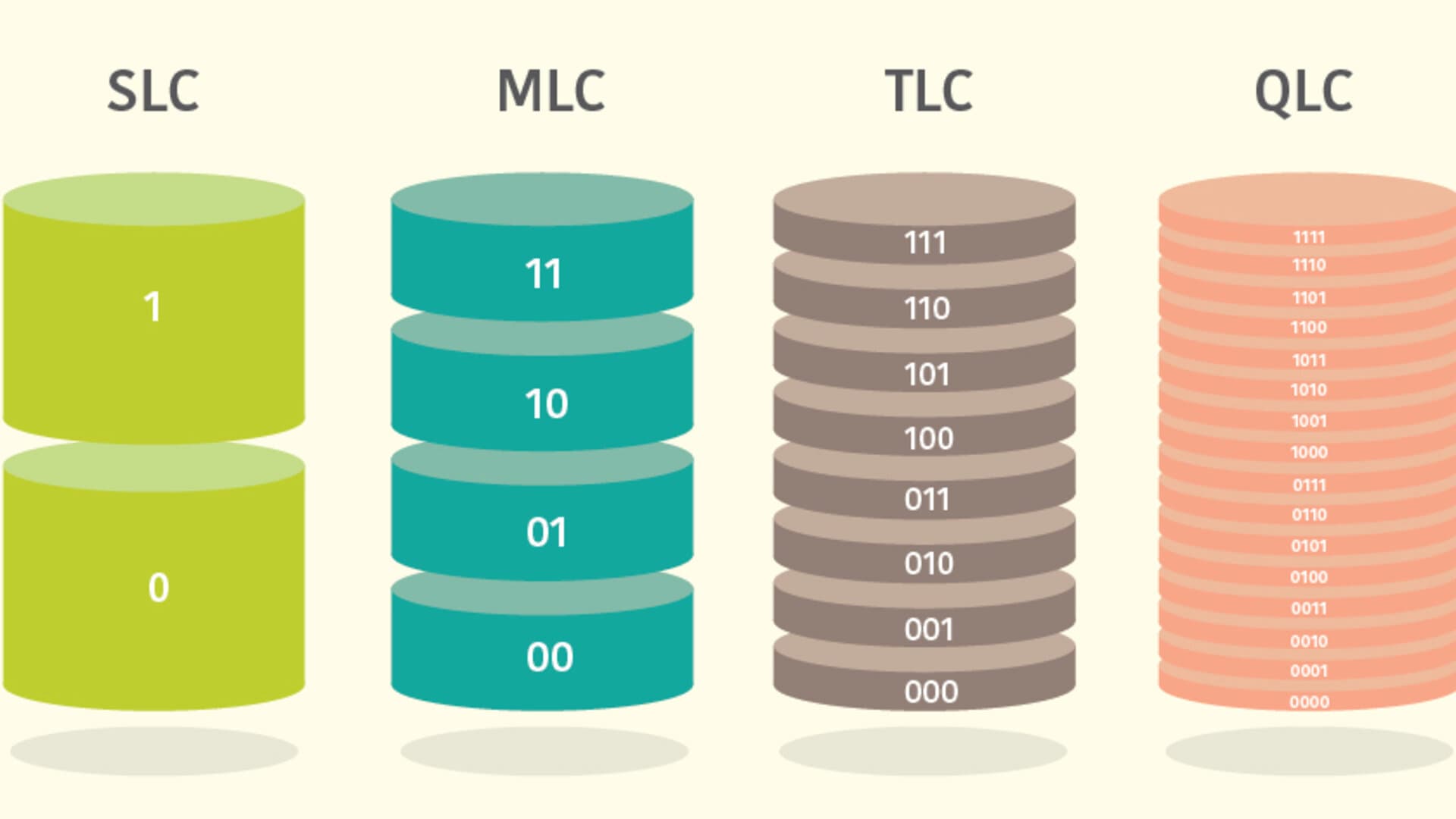
In the current digital era, solid state drives (SSDs) have become a popular option for those seeking a significant improvement in their storage performance. The speed, durability, and energy efficiency of SSDs make them ideal for a variety of applications, from personal computing to enterprise environments. Before buying an SSD, it is crucial to understand the differences between NAND memory types, which are QLC, TLC, MLC, and SLC, and how to identify them on packaging.
QLC (Quadruple-Level Cell)
QLC SSDs store four bits of data in each memory cell, which allows for high storage density and, consequently, larger capacities at a lower cost. Usually, QLC SSD packaging is often labeled as "affordable high capacity" or "storage economy".
- Bits per cell: 4 bits (four levels per cell).
- Power consumption: Higher power consumption due to bit density.
Some of the features of QLC SSDs include:
Durability and performance: QLC SSDs are usually less durable and may experience faster performance degradation due to the high amount of bits stored per cell.
Lower cost per capacity: QLC SSDs are an economical option for those who need high storage capacity at an affordable price.
TLC (Triple-Level Cell)
TLC SSDs store three bits of data in each memory cell, which balances storage capacity with greater endurance compared to QLC SSDs. TLC SSD packaging usually highlights "balanced performance" and "durability" in their labeling.
- Bits per cell: 3 bits (three levels per cell).
- Power consumption: Moderate power consumption.
Some of the features of TLC SSDs include:
Durability and performance: TLC SSDs offer a balance between capacity and endurance, making them suitable for daily use.
Reasonable cost: TLC SSDs are affordable and provide reliable performance.
MLC (Multi-Level Cell)
MLC SSDs store two bits of data in each memory cell, making them an intermediate option between TLC and SLC SSDs. MLC SSD packaging may mention "balanced performance" and "durability" similar to TLCs, as they share some characteristics, such as greater endurance.
- Bits per cell: 2 bits (two levels per cell).
- Power consumption: Moderate power consumption.
Some of the features of MLC SSDs include:
Durability and performance: MLC SSDs tend to be more durable and offer better performance compared to TLC and QLC SSDs.
Lower storage density: Because they store fewer bits per cell than TLC and QLC SSDs, MLC SSDs usually have lower storage density.
Moderate cost: MLC SSDs usually have an intermediate price between SLC SSDs and TLC/QLC SSDs.
Enterprise use and critical applications: MLC SSDs have been commonly used in enterprise applications, such as servers, workstations, and high-performance storage systems, where high reliability and durability are required.
SLC (Single-Level Cell)
SLC SSDs store a single bit of data in each memory cell, making them ideal for enterprise applications that require high endurance and consistent performance. On SLC SSD packaging, you will see terms like "maximum performance" and "extreme endurance".
- Bits per cell: 1 bit (one level per cell).
- Power consumption: Low power consumption.
Some of the features of SLC SSDs include:
Durability and performance: SLC SSDs are the most durable and offer consistent performance, making them ideal for critical applications.
Higher cost per capacity: SLC SSDs are usually more expensive in terms of cost per gigabyte due to their high quality and durability.
Conclusion: Origin doesn't matter, quality matters
The choice of a solid state drive should be based on your needs and budget, rather than the origin of the product. Whether the SSD comes from China, Japan, or Taiwan, what really matters is the quality of the NAND memory and its design, as well as the amount of bits stored per cell and power consumption. Understanding the differences between QLC, TLC, MLC, SLC and their identification in their specifications will help you make an informed decision. Ultimately, a high-quality SSD will offer superior performance and durability regardless of its origin. It is vital to consider quality, durability, performance, and power consumption before making your final decision. Make your choice wisely and enjoy fast and reliable storage!
User NewMaxx on Reddit has a spreadsheet where you can see a list of drives, specifications, and among all this, what type of drive it is. I invite you to follow him and see the spreadsheet here so you can make a wise choice. This source provides valuable information to help you make the right decision when choosing an SSD.