TimezoneDB 2022.6 - 2022f
If you are a programmer, you have probably often heard your friends and colleagues complain about the problems they face when handling time zones in their applications. One of the most common challenges is keeping the time zone database updated to ensure the accuracy of dates and times in their systems. Recently, an important decision has been made in the country related to time schedules. From now on, the "America/Mexico_City" time zone will no longer observe daylight saving time. This decision was made relatively recently and has generated significant changes in the way time schedules are handled in the country. As a result, those who work with applications that depend on time zone accuracy may face additional challenges in ensuring that their systems correctly reflect the time schedules. It is essential to take this update into account and take the necessary measures to ensure accuracy and consistency in handling dates and times in applications.
In this post, we will explore this problem in depth and present an effective solution for those who still face it. First, we will create a PHP file that will use the TimezoneDB extension to handle time zones. Then, we will create a Dockerfile to encapsulate our PHP application and ensure that all necessary components are available.
Keep reading to discover how you can implement this solution and say goodbye to time zone handling problems in your PHP applications in Mexico.
Who is responsible for making these changes and when are they carried out?
The IANA (Internet Assigned Numbers Authority) is a worldwide organization responsible for coordinating and administering various critical aspects of the Internet. Among its responsibilities is the management of time zones globally. The IANA maintains and updates the time zone database used by different systems and applications around the world.
Changes in time zones, such as the one that recently occurred in "America/Mexico_City", are implemented by the IANA. These changes may be related to government decisions, adjustments in daylight saving time policies, or any other modification that affects the way dates and times are handled in certain regions.
It is important to note that developers and system administrators depend on the information provided by the IANA to keep time zones updated in their applications and systems. Changes made by the IANA directly impact how dates and times are represented and handled in different regions of the world.
In summary, the IANA plays a fundamental role in the coordination and updating of time zones worldwide. Its decisions and changes in the time zone database can have a significant impact on the development and functioning of applications and systems that depend on the accuracy of dates and times. Therefore, it is essential to be aware of the updates provided by the IANA and take the necessary measures to adapt to changes and maintain accuracy in handling time zones. You can get more information about them here{:target="_blank"}.
How can we know which version of the time zone database to use?
In release version 2022f of the time zone database, the time change in Mexico is specifically mentioned among many other changes. This change was implemented to reflect the decision that the "America/Mexico_City" time zone will no longer observe daylight saving time. The database update ensures that applications and systems that depend on this time zone correctly reflect the new schedules in Mexico, thus ensuring accuracy in handling dates and times in the country. This inclusion in release 2022f highlights the importance of keeping time zone databases updated to adapt to changes and ensure the correct representation of schedules in different regions of the world.
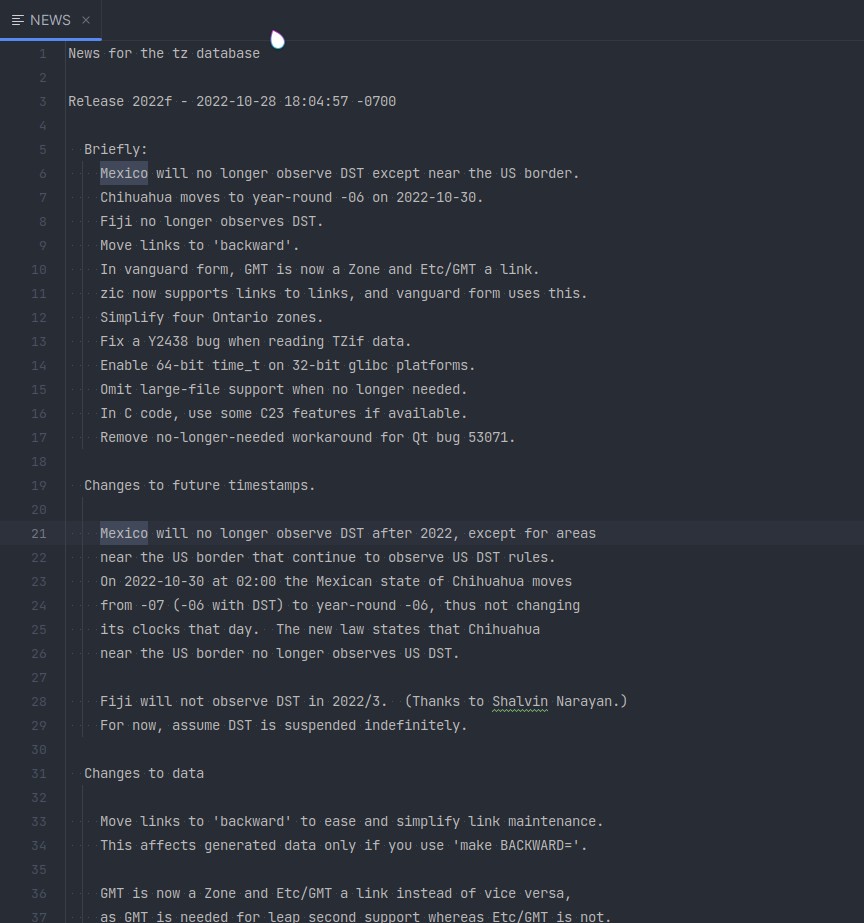
You can verify the information by downloading the time zone database here and opening the file called "NEWS". This database provides details about the changes and updates made in the specific version of the time zone database.
Now that we know the version of the time zone database we should use, it is important to link it with the PHP extension called TimezoneDB maintained by Derick Rethans.
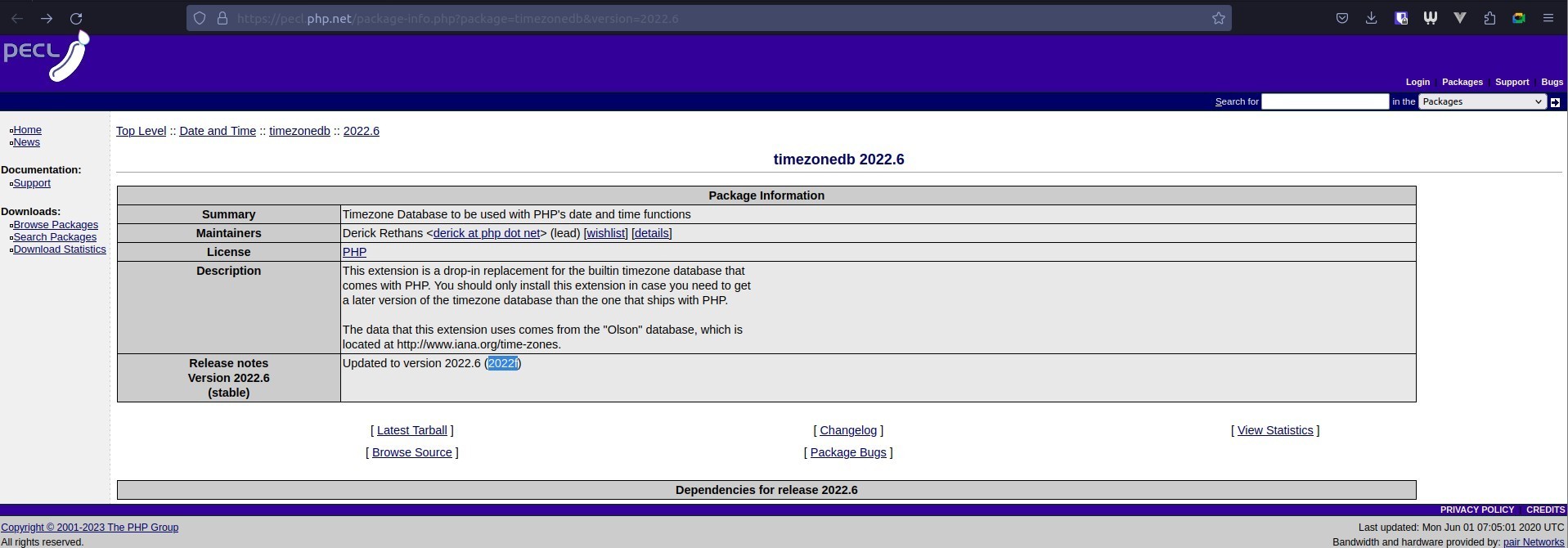 You can get more information about the specific version and its time zone correction in this reference. From this version onwards, we can trust that time zones will be correct and accurate in our applications.
By using the correct version of the time zone database in combination with the TimezoneDB extension, we can ensure that dates and times in our systems accurately reflect the changes made in time zones.
Creating a PHP file
We will do a test with a Dockerfile but first we must create a PHP file for said test. Below is an example of a basic PHP file that shows the current date and time:
<?php
// Get the current date and time
$currentDate = date('Y-m-d');
$currentTime = date('H:i:s');

// Print the current date and time
echo "Current date: " . $currentDate . "<br>";
echo "Current time: " . $currentTime . "<br>";
?>
Creating a Dockerfile
Once you have created the PHP file, it is time to create the Dockerfile to encapsulate your application and ensure that all necessary components are available. Below is an example of a basic Dockerfile:
FROM php:latest

RUN apt-get update

RUN pecl install timezonedb-2022.6
RUN echo "extension=timezonedb.so" >> /usr/local/etc/php/conf.d/docker-php-ext-timezonedb.ini

RUN echo "date.timezone = America/Mexico_City" >> /usr/local/etc/php/conf.d/timezone.ini

COPY . /var/www/html

EXPOSE 80

CMD ["php", "-S", "0.0.0.0:80", "-t", "/var/www/html"]
With this Dockerfile, you can build a Docker image that includes PHP and version 2022.6{:target="_blank"} of TimezoneDB. Make sure to copy your application files in the right place and modify the configuration according to your needs.
Building the image and container
-
Open a terminal and navigate to the directory where you have the Dockerfile and the PHP file.
-
Build the image using the
docker buildcommand.
docker build -t fix-timezonedb:dev .
This will build the image using the current context (the current directory) and assign it the specified name.
- Once the image has been built, you can run a container based on that image using the
docker runcommand.
docker run --rm -d -p 3001:80 --name timezonedb fix-timezonedb:dev
This command will run a container in the background (-d), remove the container when it stops, and map port 80 of the container to port 80 of the host (-p 80:80). It will also assign the specified name to the container (--name container_name).
Once you have executed the docker run command, you will be able to access your PHP application from a web browser by entering the address http://localhost:3001.
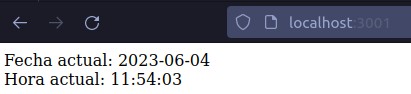
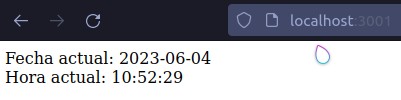
Note: You can test by commenting the line "RUN pecl install timezonedb-2022.6" to notice the difference.
Remember that these commands assume you have Docker installed on your system. Make sure you have the necessary permissions to run Docker commands and adjust them according to your specific environment.
Results
Below, we can observe the results before and after, noting that it was 10 in the morning.
Conclusions
Handling time zones in PHP applications can present challenges, especially when using old versions of PHP that no longer receive support. The lack of official TimezoneDB updates can lead to accuracy problems in dates and times, which can affect the functionality of applications.
Remember that it is always recommended to keep PHP versions updated and use reliable libraries or packages for handling time zones, as this helps ensure accuracy and security in processing dates and times in your applications.