AJAX
by Hugo Hernández Valdez

These days I have noticed that many developers do not have a clear idea of how to handle asynchronous processes, specifically making HTTP requests to a server with JavaScript, so I will talk a little bit about AJAX.
What is an HTTP request?
An HTTP request is how the action of the browser requesting a document or file from a web server is usually referred to, whether it is an .html file, an image, a font, a .js file, etc. Thanks to this request, the browser can download that file, store it in a temporary cache of browser files, and finally display it on the current page that requested it.
What is AJAX?
Let's start with two concepts for a process in JavaScript:
- Synchronous: It is a process that runs at the same time as others.
- Asynchronous: It is a process that runs at a different time than others.
Quoting MDN: "Asynchronous JavaScript + XML (AJAX) is not a technology in itself, it is a term that describes a new way of using several existing technologies together. This includes: HTML or XHTML, CSS, JavaScript, DOM, XML, XSLT, and most importantly, the XMLHttpRequest object."
But... So can I only use XML to transfer data from server to client and vice versa? The answer is no, XML is a meta-language that was used in the early days of AJAX to represent structured information. Nowadays, JSON is commonly used; it is a bit simpler, however, different types of technologies are also handled in this information transfer.
Well, we have already seen concepts and what they represent, but perhaps you still have the same doubts, Why? Or What for? I will show you with a graphical representation.
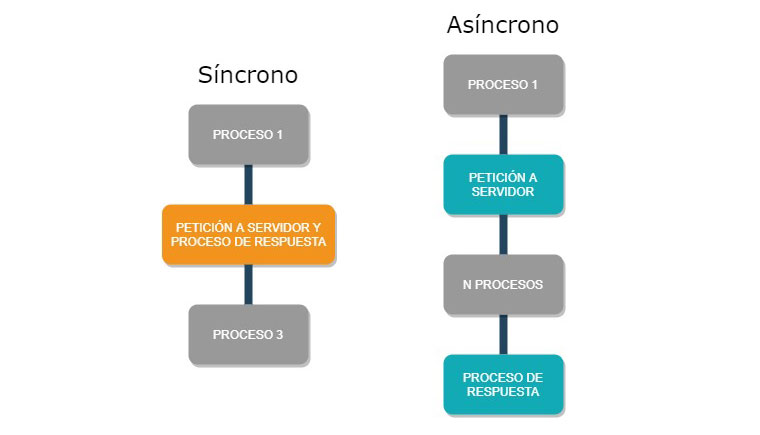 Representation of synchronous and asynchronous requests
As you can see in the image, a synchronous request is sent and waits for the server's response, then processes the response and continues any other process. This practice is now deprecated because it does not provide a good user experience and in some cases blocks the "Event-Loop", a topic I will dedicate a post to.
In the same image we see how an asynchronous request is executed. It is performed and after it, "n" number of processes can be executed because we do not know how long the server will take to respond, which allows us to execute other processes. When it responds, we then process that information. With this practice, we avoid blocking the "Event-Loop" and improve the user experience by not blocking the site.
So as Linus Torvalds would say:
Talk is cheap. Show me the code…
First, we will create a very simple HTML structure.
<!DOCTYPE html>
<html lang="en">
<head>
    <meta charset="UTF-8">
    <meta http-equiv="X-UA-Compatible" content="IE=edge">
    <meta name="viewport" content="width=device-width, initial-scale=1.0">
    <title>AJAX</title>
</head>
<body>
    <strong>Hello, this is a list of Pokémon</strong>
    <ol id="pokemons"></ol>
</body>
<script src="./app.js"></script>
</html>
As you can see, we will create a list of Pokémon using the resource from https://pokeapi.co. Now, within this structure, we see how we call a script called app.js which will contain the following.
First, the simplest part: we will create a function that can populate our list based on an array.
function fillList(pokemons) {
    let list = document.getElementById('pokemons');
    pokemons.forEach(pokemon => {
        let li = document.createElement('li');
        li.appendChild(document.createTextNode(pokemon.name));
        list.appendChild(li);
    });
}
We will also create the function that will execute the request to the pokeapi resource.
function request(async) {
    console.log('Request to server');
    let req = new XMLHttpRequest();
    req.open('GET', 'https://pokeapi.co/api/v2/pokemon?limit=50&offset=200', async);
    req.onreadystatechange = function (aEvt) {
        if (req.readyState == 4) {
            if(req.status == 200) {
                let response = JSON.parse(req.responseText);
                fillList(response.results)
                console.log('Response process');
            } else {
                console.log('Error loading page');
            }
        }
    };
    req.send(null);
}
As you can see, this function contains a parameter called "async". Through this, we will tell it whether the request is asynchronous or not, in order to test what is explained in the diagram. Finally, we will create an event that executes when all the content of the page is loaded.
document.addEventListener('DOMContentLoaded', function(event) {
    console.log('Process 1');
    request(false);
    console.log('Process 2');
});
Now let's do some tests. In this first test, since the request is not asynchronous, the result we should get in the console is:
Process 1
Request to server
Response process
Process 2
This is correct, but as already explained, it is not the most recommended. Let's move on to what interests us a bit more: the asynchronous request. The result of this should be as follows:
document.addEventListener('DOMContentLoaded', function(event) {
    console.log('Process 1');
    request(true);
    console.log('Process 2');
});
Process 1
Request to server
Process 2
Response process
Process 2 represents "n" processes that could be executed before the server responds, which gives us many possibilities that will only be limited by our imagination. Also, finally, the result of both requests within the page is the list of Pokémon as shown in the following image.
In this example, we used the "XMLHttpRequest" object, but there is also "Fetch API" and some other libraries that are quite interesting. I invite you to explore them.
Conclusion
AJAX is a tool that helps us significantly reduce network traffic and load times to provide users with a better experience on our sites.
Related posts

Redis Pub/Sub
Redis Pub/Sub, which stands for *Publish and Subscribe*, is a messaging mechanism that allows applications to communicate in real time through channels or topics. Redis, an in-memory database, provides this functionality efficiently.
Scaffolding Typescript API - Part 1
How to create a base structure for an API with TypeScript?